


Every business owner knows the frustration: you have all the data you need, but getting answers from it takes too long. AI dashboard assistants are changing that by letting you ask questions in plain English and getting instant, accurate results — no technical skills required. In this guide, we explore exactly how AI dashboard assistants turn data headaches into clear, actionable insights for your whole team.
Table of Contents
How AI Dashboard Assistants Work
What if sorting business data was as easy as texting a friend? AI dashboard assistants make this possible by understanding what you want in plain English and finding the answers instantly. Instead of navigating complex menus or writing database queries, you simply type your question — and the AI does the rest.
According to Gartner’s research on augmented analytics, AI-powered data tools are rapidly becoming the standard for business intelligence, with natural language interfaces leading adoption among non-technical users. Similarly, McKinsey’s report on data-driven enterprises highlights that companies using conversational BI tools see measurable gains in decision-making speed.
Traditional Approach vs AI Dashboard Assistant
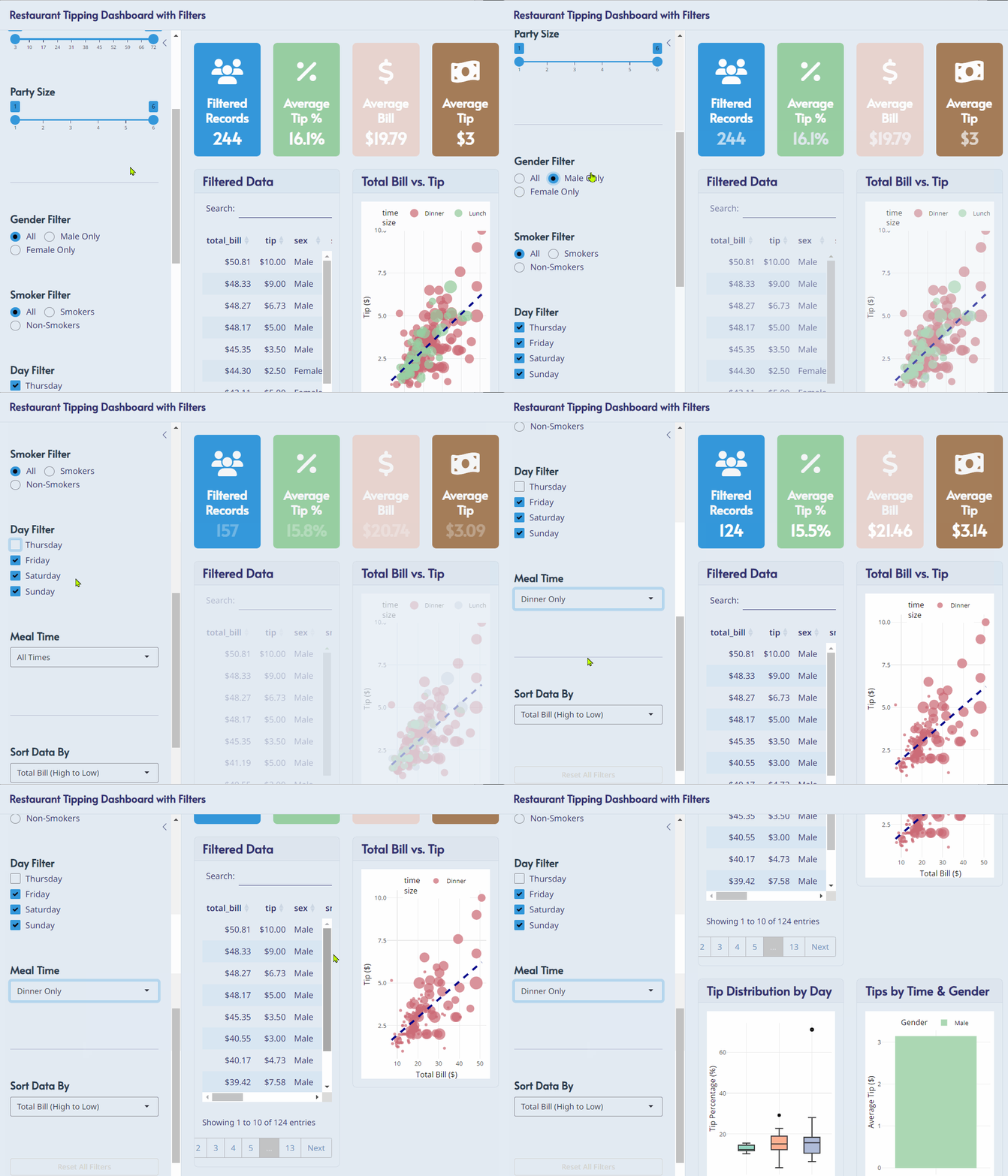
The Old Way — Without an AI Dashboard Assistant:
- Open the dashboard manually
- Set the date range to weekends
- Select “dinner” from the time menu
- Apply a gender filter
- Wait for data to load
- Repeat the entire process for every new question
The New Way — With an AI Dashboard Assistant:
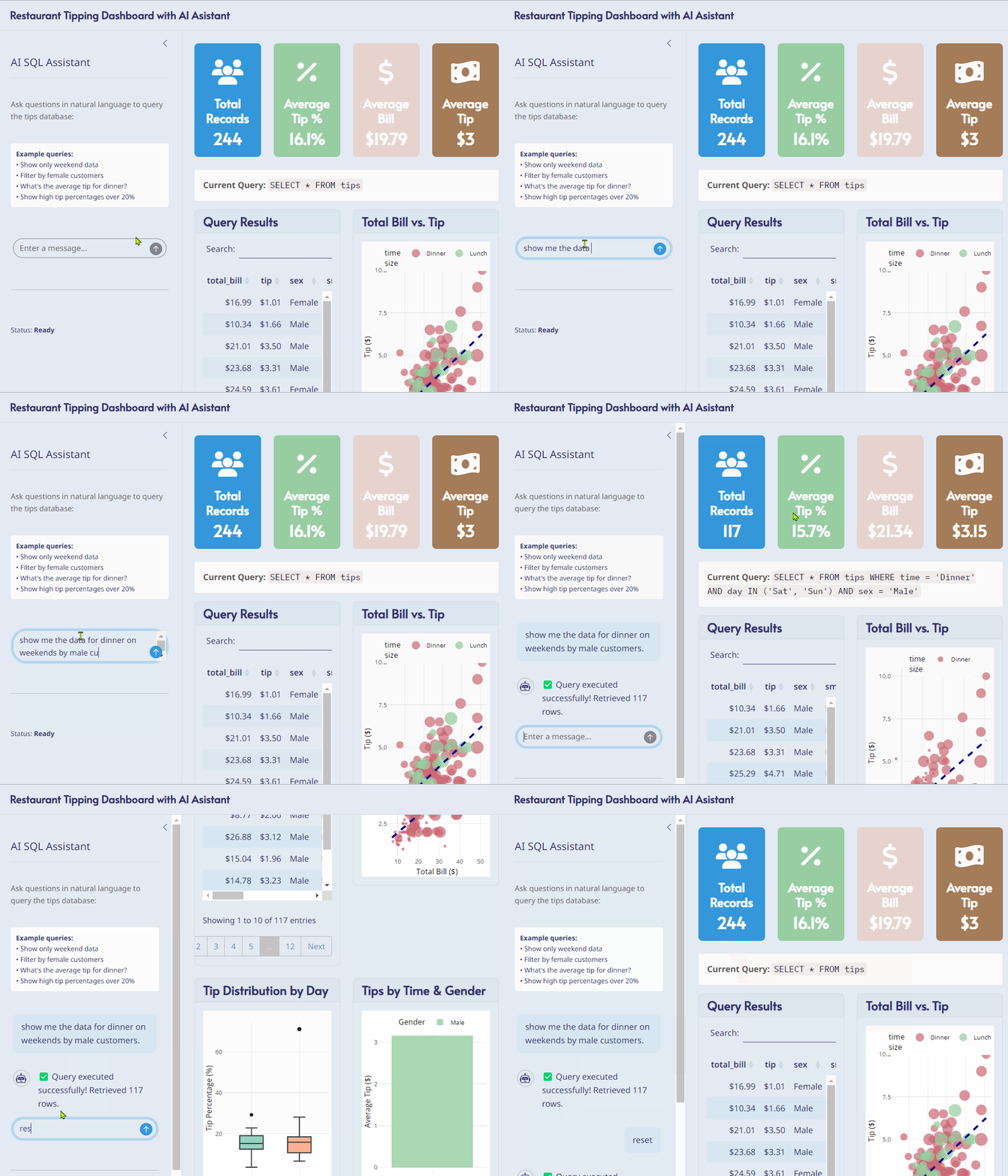
You simply ask: “What’s the average tip for weekend dinners by customer gender?”
And get immediate results with charts included — in seconds.
Real Business Impact
The power of AI dashboard assistants becomes clear when you look at how they change day-to-day decisions across different roles and industries.
For Restaurant Managers: “Which servers earn the highest tips?” gets answered instantly instead of requiring a report request to IT. You can spot trends, reward top performers, and adjust staffing — all before the next shift starts.
For Sales Teams: “How did we perform compared to last quarter?” becomes a 30-second conversation instead of a 30-minute data hunt. Your team spends more time selling and less time wrangling spreadsheets.
For Executives: “Show me our profit margins by region” delivers boardroom-ready insights without analyst support. Strategic decisions that once waited days for a report can now be made in real time.
Want to see how this fits into a broader data strategy? Read our guide on business intelligence tools for small business owners for more context on building a data-driven operation.
Why AI Dashboard Assistants Change Everything
There are 4 core reasons why AI dashboard assistants represent a genuine shift in how businesses handle data — not just a minor upgrade.
- Speed: Questions get answered in seconds, not hours. Your team no longer waits for IT or analysts to run reports.
- Accessibility: Anyone can get insights, regardless of technical skill. If you can write a text message, you can use an AI dashboard assistant.
- Depth: Follow-up questions build naturally — “Now show me just the lunch crowd” or “What about male customers only?” The assistant keeps context from your previous questions.
- Accuracy: AI eliminates human error in data filtering and calculations, giving you confidence that the numbers you see are correct.
The Technology Behind the Scenes
You don’t need to understand the engineering to benefit from an AI dashboard assistant — but it helps to know what’s happening behind the scenes. When you type a question, the AI:
- Converts your question into SQL automatically — the database language that retrieves and filters your data
- Maintains context so follow-up questions make logical sense without starting over
- Selects the right chart type for your data automatically — bar charts, pie charts, trend lines, and more
- Validates the output against your data structure so you don’t receive misleading results
This natural language processing capability is powered by the same large language model technology discussed by OpenAI’s research team — adapted specifically for structured business data environments.
What Your Team Will Love
Adopting an AI dashboard assistant is one of the lowest-friction technology upgrades a business can make. Here’s why your team will embrace it from day one:
- No More Training: If you can send a text message, you can use an AI dashboard assistant. Zero onboarding curve.
- No More Waiting: Get answers when you need them, not when IT has time. Decisions move at the speed of business.
- No More Guessing: Ask questions the way you naturally think about them — no need to learn a specific query syntax or menu structure.
- No More Frustration: Your data finally works for you, not against you. Everyone on your team becomes a confident data user.
Is an AI Dashboard Assistant Right for Your Business?
An AI dashboard assistant is a strong fit for your business if you recognise any of the following situations:
- Your team regularly waits on IT or analysts to get basic reports
- Non-technical staff avoid the dashboard because it feels too complex
- Decisions are delayed because data is hard to access or interpret
- You have valuable data but lack the resources to analyse it consistently
If any of those sound familiar, a conversational AI dashboard assistant could be a transformative investment. Businesses of all sizes — from local restaurants to regional enterprises — are already seeing the benefits. You can also explore how SATOM’s data analytics services complement an AI assistant setup for a complete business intelligence solution.
Key Takeaways
- AI dashboard assistants let anyone query business data using plain English — no SQL or technical training required.
- They replace slow, manual dashboard navigation with instant, conversational answers.
- Real-world use cases span restaurants, sales teams, and executive decision-making.
- The technology automatically handles SQL translation, context memory, and chart selection.
- Teams adopt them quickly because there is no meaningful learning curve.
Coming up next: We’ll break down the real costs and benefits so you can decide if an AI dashboard assistant is the right investment for your business.