


Table of Contents
Stop Wrestling with Dashboards — AI Assistants Are the Smarter Way Forward
AI assistants are fundamentally changing the way business teams interact with data — and if your team is still wrestling with complex dashboards, you’re losing precious time every single day. Remember the last time you needed a quick answer from your data? Maybe you wanted to know “How are our weekend sales doing?” or “Which customers tip the most?” If you’re like most business professionals, getting that answer probably involved:
- Adjusting slider bars and dropdown menus
- Trying to remember which filters to use
- Waiting for someone from IT to help
- Eventually giving up and making decisions with gut instinct
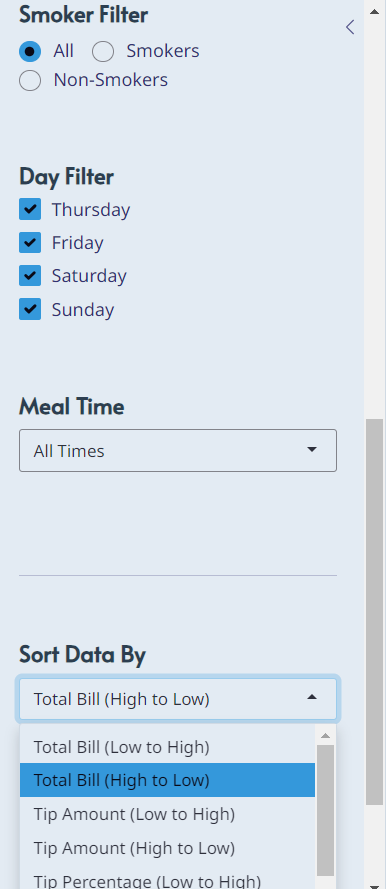
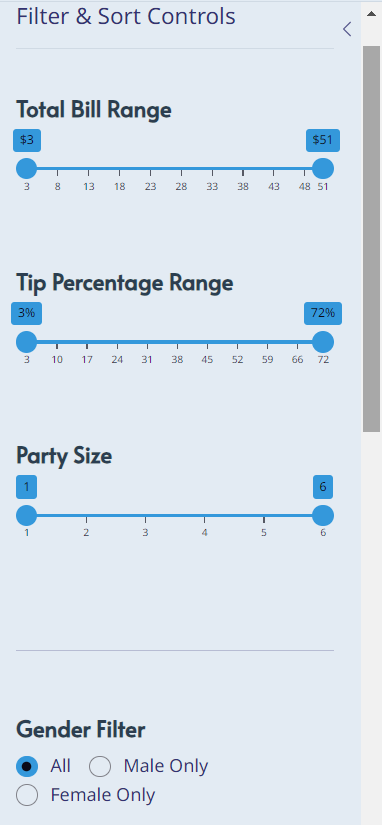
You’re not alone. Most business dashboards today are built for data analysts, not the people who actually need to make quick decisions. It’s like needing an engineering degree just to check your car’s fuel gauge. That’s exactly the problem that AI assistants are designed to solve.
The Real Cost of Complex Dashboards
While you’re clicking through menus and waiting for reports, your competitors might already be getting answers in seconds. Here’s what overly complex dashboards really cost your business:
Lost Time: Simple questions take 10–15 minutes instead of 30 seconds.
Missed Opportunities: Great insights stay hidden because finding them is too hard.
Decision Delays: Meetings get postponed because “we need to pull some data first.”
Employee Frustration: Your smartest team members feel helpless when dealing with data.
According to McKinsey’s research on data-driven enterprises, companies that democratise data access across teams make decisions up to 5x faster than those relying on centralised analyst bottlenecks. The solution is not better dashboards — it’s eliminating the dashboard barrier altogether with AI assistants.
What Are AI Assistants?
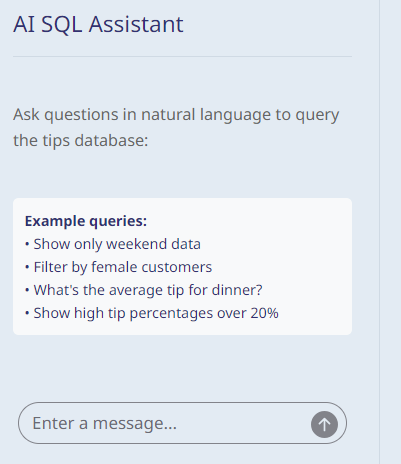
AI assistants for business data are intelligent tools that allow any team member — regardless of technical background — to ask questions in plain language and receive instant, accurate answers. Instead of navigating complex filter panels, you simply type or speak a question like “What were our top 5 revenue days last quarter?” and the AI assistant retrieves, analyses, and visualises the answer for you.
Unlike traditional business intelligence tools that require SQL knowledge or data training, modern AI assistants understand natural language. They connect directly to your existing data sources — whether that’s a POS system, CRM, or cloud database — and translate your everyday questions into precise data queries behind the scenes.
To understand more about how natural language processing powers these tools, the team at IBM has an excellent primer on NLP technology that explains the underlying mechanics in plain terms.
7 Ways AI Assistants Transform Your Business
Here are seven concrete, proven ways that AI assistants create immediate value for business teams:
- Instant answers in plain language — No more waiting for the data team. Ask, and receive.
- Zero training required — If your team can write an email, they can use an AI assistant.
- Always-on availability — Get insights at 11pm before a morning board meeting, no IT ticket needed.
- Fewer errors — Human-guided filtering is prone to mistakes. AI assistants apply logic consistently every time.
- Faster meetings — Walk into every meeting already knowing the numbers.
- Empowered non-technical staff — Managers, sales leads, and floor supervisors can self-serve data without depending on analysts.
- Scalable insights — As your data grows, AI assistants scale with it — no additional headcount required.
Real-World Use Cases for AI Assistants
Let’s make this concrete. Here are examples of how different teams use AI assistants every day:
Restaurant & Hospitality: A floor manager asks “Which servers had the highest tips on Friday evenings last month?” — and gets an instant ranked list. No spreadsheets, no waiting.
Retail: A store owner asks “What products are underperforming compared to last year?” — and receives a visual breakdown with percentage changes, ready to share with the buying team.
Professional Services: A project lead asks “Which clients have had the most support tickets in the last 90 days?” — and immediately knows where to focus retention efforts.
These aren’t futuristic scenarios. At SATOM, we’ve built and deployed AI assistants exactly like these for businesses across Europe. If you’d like to see how we approach this, explore our data services and AI solutions or read how we helped one client reduce their reporting time by over 80%.
How to Get Started with AI Assistants
Adopting AI assistants doesn’t require replacing your entire tech stack. Most implementations follow three simple steps:
- Connect your data sources — Your POS, CRM, or database is linked securely to the AI assistant layer.
- Define your key questions — Work with your provider to identify the 10–20 questions your team asks most often.
- Roll out to your team — Because there’s no complex interface to learn, adoption is typically very high within the first week.
For a broader view of how AI is reshaping business intelligence, Gartner’s AI research hub provides authoritative industry benchmarks and adoption trends worth reviewing before making your investment decision.
You can also explore our